If you are befuddled by all those "rss" and "Subscribe to my feed" buttons, you need first to view the new free Utube video about using feed readers - | here |; and second, you need a good feed reader. I personally use and love Google's web-accessible, easy-to-use Google READER which has just added the capability to search across all the feeds I am subscribed to. Read about it in Google's official blog:
link: Official Google Blog: Find a needle in a feedstack with Google Reader
(By the way, to subscribe to a feed almost always just means "get the feed" and doesn't involve joining anything, putting your name on somebody's site, or paying one single thing, in case you don't know. And if you don't, you need to look at that video mentioned above.)
With a decent feed reader and a strong list of sites you "subscribe" to, you can locate most of those neat links Dick Eastman points you to before he gets them into his newsletter. To do it my way, all you need is a Google account.
I'll just say here - yet again - that imho, genealogists who don't have a Google account are missing the opportunity to use some of the greatest free services available - many of which will teach you about new technologies you can use in your genealogy research (like feeds!). Are privacy issues the problem? Well, sometimes I can't help wonder if the people who are worried about Google and privacy actually read the privacy policies of any the search engine companies they use. I suspect they don't.
For the family history researcher, Google offers free chat capabilities built into its web mail accounts; document collaboration with other family members using Google Documents and Spreadsheets; quick, annotated - public or private - bookmarks available from any computer with Google Notebook; web page creation with their Documents and Spreadsheets or free blogspot blogs and server space on blogger.com or entire websites and webspace (using free templates) with Googlepages; free online, searchable web albums with Picasa and Picasweb; free webmaster analysis tools (APIs), etc.
Google's free online collaboration tools are excellent and, to my mind, extremely easy to opt into and out of. Their sharing options - Public & Shared or Private - are easy to locate and to use.
Google's privacy policies have been accused of vagueness, but as a long-time Google user, I have always found its privacy policies to be clear, concise, straightforward, and nonthreatening. I believe Google says - and pretty much always has - exactly what it is collecting and how it is used. Google does not collect personally identifiable information unless you give it to them outright - in a posting of some sort, for instance, or in a credit card used to purchase items with Google Checkout. And for me, the clincher is that I have yet to discover Google hiding scary information about its cookies/beacons or stashing the policies and opt-outs in obscure links like some other well-known search engine conglomerates.
Most genealogy researchers are well aware of privacy issues - especially after 9-11 and passage of the Patriot Act. Some of us are also aware that many of the new ways implemented to protect personal information have their downsides.
The best way for us personally to protect our privacy and that of our family members is, and always has been, to keep abreast of privacy issues and to advocate or protest when necessary; to keep informed about unfolding consumer frauds and scams; and to learn to use the tools available to us. Today that includes learning the best ways to protect our privacy and that of our family members online. One quick hint: it may well be not to use Yahoo with its web beacons or your Microsoft Windows Explorer browser - formerly Internet Explorer - which can only be removed with unknown consequences to your entire Windows operating system. (How scary is that?)
We need to learn how to set our browser's internet options so that by default we only save cookies we explicitly choose to save once we've closed that web browser. We need to learn about phishing. We need to read every link in every privacy policy page in every web service - free or paid - that we use.
We need to recognize that when we submit data to an ancestry.com family tree (awt) we have created within our subsciber accounts, it gets integrated into search results. Even individuals in those trees we mark private show up, offering other subscribers the option to contact us anonymously [ahem!] for more information about people in our not-so-private private trees. Read the fine print for yourself. You will see that it tells you that even if you opt NOT to share your ancestry family tree, ancestry.com users still have the capability not only to learn whether or not specific deceased individuals exist in your tree but the birth year and birthplace of the people and your username. Despite an appended parenthetical note meant to assure me that no personal information about me is included, I am not entirely persuaded. I'm not sure that I want viewers to have the capability of connecting my username with data I explicitly chose to be "private." Moreover, I certainly do not appreciate getting the sort of blanket inquiries I sometimes get as a result of this policy which ancestry declares will benefit us all.
I'm betting all ancestry family tree creators know exactly what I'm talking about. I bet they know all about the kinds of people who reveal absolutely nothing about their own connections - if any at all - to the people whose data they want me to share with them. They know all about the people who simply click on the form letter which asks the generic question, "Do you have more information about this person that you could share with me?" I cannot tell you how many times I have wanted to write back and say, "Yes, I have more information I could share. But do I want to? Not today."
Come on, if you have actually read any of these blog pages or pages on any other of my TnType genealogy sites, you know that I am all into sharing and sharing freely. You can check. That does not mean, however, that I want to give all my hard-sought primary research - some of which I had to pay to locate via genealogy trips or paid subscriptions - to people who are too lazy even to add one personal line to an editable form letter or to those who obviously do not know how to use a search engine properly because if they did, they would have found heaps of my data online with two or three decent search terms. (To see what I mean, in Google or Yahoo, type in giles roane or type in roane giles. These days, you can find genealogy information about Roane County, Tennessee GILES surname individuals on your first results page.)
Okay, so while I'm ranting, I am going to take the opportunity to say, too, that I was more than a little disconcerted when I recently started getting ancestry.com update emails that said, " Our family tree is growing. [My username] just added [the number of people I had added and their names]." Like ancestry's inclusion of itself would make me happy!
One more thing along the lines of ranting: this entry has yet to say anything about the fact that I have easily located countless living family members; household members last known to be living with them; approximate birthdates of everybody in the household; home addresses and phone numbers; and record numbers in ancestry's "Public Records Index" database. Yet census data can't be revealed for 72 years following its collection.
People are afraid of Google?
The major reason I go ahead and create ancestry online trees that I want to keep private - despite knowing that I can't - is so that I don't constantly have to switch back and forth from ancestry to my beloved Legacy genealogy software program, a tactic which also allows me to view the people I'm currently researching on ancestry's site for from any computer anywhere - libraries, relatives' homes, etc. It also permits me to attach census images as sources to people and save that information when I don't have the time or energy to transcribe the census data.
And, yes, I am well aware that I have moved far off track from my original stated posting title. Regular readers are used to me doing that.
So, back now to Google Reader's new search capability:
Now I can quickly catch up with new information that has been posted on favorite websites and blogs - those whose feed I subscribe to - about "giles died roane" or "majors rockwood tn" or "cherokee brandon graves" etc. without visiting each site despite missing the feed for it when it was first published online.
Be adventurous. Try some of the stuff I talked about in this entry. But, hey, let's be careful out there. And watch your back. Always.
Showing posts with label genealogy tool. Show all posts
Showing posts with label genealogy tool. Show all posts
Saturday, September 15, 2007


Monday, October 16, 2006
GOOGLE documents and spreadsheets for genealogy blog writing
GOOGLE Docs & Spreadsheets -- why would you want to use GOOGLE's free online document and spreadsheet creation, editing, and document storage program to create a genealogy blog page when your blogging software already has a wysiwyg editor? well, here are a few reasons for that and for other things, too:
1. number one for me is that the interface is roomy, so i'm not constantly having to scroll up and down after adding forty lines of text.
3. GOOGLE stores the documents you create free for you. if you want to "publish" to the web, GOOGLE lets you do that and stores the documents for you.
Microsoft Word OpenOffice .rtf .pdf HTML zip spreadsheets can also be saved and downloaded in a variety of formats:
Comma Separated Value (.csv) HTML .ods .pdf Microsoft Excel (.xls)
5. you can import existing documents of 500 k or less from your hard drive in the same popular formats mentioned above. the following is information about size limits for documents, images, and spreadsheets from the help pages for the software:
7. there is an export wizard for all popular blog interfaces. you can export to a sponsored blog (like this one at blogspot) or to your own blog on your own domain. if you are wanting to export to just one blog, you need only enter the export settings once. if you have multiple blogs, you'll have to change the wizard data for each blog each time.
and - need i say it? you can just create any kind of genealogy document online, collaborate on it online, and then let each collaborator do whatever he or she pleases with it.
you don't have to have to have a blog to find this service useful and easy. and, no, this is not a sponsored plug....
1. number one for me is that the interface is roomy, so i'm not constantly having to scroll up and down after adding forty lines of text.
i know that blog entries are supposedly supposed to be short, that readers purportedly don't like reading large chunks of text on a browser. however, researchers slogging their way through a blogging interface is already challenging enough. if we're looking for a new resource or a quick link or tutorial, that's one thing. if we're looking for an entire family, that's quite another.2. my number 2 is likely number 1 for other genealogists: GOOGLE lets you collaborate in creating the documents and/or spreadsheets online. last week, GOOGLE combined the well-respected WRITERLY, which it had purchased, to its already free online spreadsheet program. that gave users a tested interface and the ability to collaborate and share documents online with ease.
i really appreciate the genealogy blog that gives me good, meaty-sized hunks of information in one entry; and so that's what i try to do. but that often means having to move up and down inside the textarea of the editor to double-check that i'm not repeating myself or to make sure i'm not leaving something important out. the typical blog interface is, as i've noted, forty lines long. then you've got to start scrolling to go back and check things. yech!
with GOOGLE documents and spreadsheets, i can have most of my entire screen in which to work. it's much like using a word processor. and, as in my blogging software interfaces, i can opt to edit my html when necessary and with ease. or not.
3. GOOGLE stores the documents you create free for you. if you want to "publish" to the web, GOOGLE lets you do that and stores the documents for you.
you can also simply store the documents you create online with compliments of GOOGLE. although there is a limit for uploading images to use in your documents, there is no set storage or transmission limit for the texts you create. you can view the terms of use for GOOGLE Docs & Spreadsheets | here |.4. docments created with the online software may be saved and downloaded in many different, popular formats :
5. you can import existing documents of 500 k or less from your hard drive in the same popular formats mentioned above. the following is information about size limits for documents, images, and spreadsheets from the help pages for the software:
Each document can be up to 500K, plus up to 2MB per embedded image.6. you can upload and store images - free - to use inside your documents. (see item 5 above for some information and limits). note: i'm sure there must be some total limit (i.e. for all your images combined), as well, but if there is, i haven't found it yet.
Each spreadsheet can be up to 10,000 rows, or up to 256 columns, or up to 50,000 cells, or up to 20 sheets -- whichever limit is reached first.
You can import file sizes up to approximately 1 Mb in .xls or .odf format
7. there is an export wizard for all popular blog interfaces. you can export to a sponsored blog (like this one at blogspot) or to your own blog on your own domain. if you are wanting to export to just one blog, you need only enter the export settings once. if you have multiple blogs, you'll have to change the wizard data for each blog each time.
and - need i say it? you can just create any kind of genealogy document online, collaborate on it online, and then let each collaborator do whatever he or she pleases with it.
you don't have to have to have a blog to find this service useful and easy. and, no, this is not a sponsored plug....
WANT AN EXAMPLE - or TWO?
1. well, i have created a document about my great-grandmother DICA ANN "DICY" (SMITH) GILES using google documents & spreadsheets and am storing it on google's servers. you can view it
| here |
2. i also exported it using the blog export function built into the google docs & spreadsheets interface, and so that same document can be viewed on my tn type.com blog
| here |.
Monday, October 09, 2006
free online source citation generator - citing sources easily
those doing genealogy research quickly learn that our data is only as good as its source. keeping track of ways to document all the different items we use as source materials, however, can be a pain - online GEDCOMS, courthouse records, cassette tapes, interviews, newsletters, etc.
even the best genealogy software programs don't readily solve all our sourcing questions. the online citation generator at citationmachine.net is a great adjunct to the sourcing wizards built into most contemporary genealogy programs.
with its online generators, you can figure out how to style just about any source properly - or at least get a good an idea of how to adapt one to use for that source that's got you stumped.
the generator is actually a series of forms you select from based on what kind of source you have used - print or nonprint. the descriptors are good, and so a form is usually easy to pick. each of them allows you to input your various bits of publication data - eg. publication name, author, editor, compiler, publisher, date, page, book name, periodical name, and so forth; click a button; and voila - get all your bits stitched together, all translated into proper citation format which can then be cut and pasted into your software or into a word processor for further "fancifying."
try it! it's free, free, free....
http://citationmachine.net/
even the best genealogy software programs don't readily solve all our sourcing questions. the online citation generator at citationmachine.net is a great adjunct to the sourcing wizards built into most contemporary genealogy programs.
with its online generators, you can figure out how to style just about any source properly - or at least get a good an idea of how to adapt one to use for that source that's got you stumped.
the generator is actually a series of forms you select from based on what kind of source you have used - print or nonprint. the descriptors are good, and so a form is usually easy to pick. each of them allows you to input your various bits of publication data - eg. publication name, author, editor, compiler, publisher, date, page, book name, periodical name, and so forth; click a button; and voila - get all your bits stitched together, all translated into proper citation format which can then be cut and pasted into your software or into a word processor for further "fancifying."
try it! it's free, free, free....
http://citationmachine.net/
Sunday, August 13, 2006
tennessee county formation maps for census work
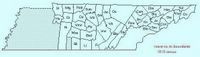
tennessee county formation maps and formation information - helpful for census and migration use - can be found as ani-maps online | here |
with the map on this page, you can follow a county year to year with three different kinds of county outline maps:
1. plain outline maps can be shown with changing boundaries for each county from census to census. roane county was established in 1803 and can be followed from 1810 forward, for instance.
2. outline maps of any census year with an outline map of the county during the previous census as an overlay, permitting you to see additions or subtractions to the boundaries.
3. outline maps of any census year with an outline map of the county during the next census as an overlay, permitting you to see future additions or subtractions to the county's boundaries (similar to #2 above). click on 1840 map, for instance, to see the changes in roane county's boundaries between the 1840 and 1850 censuses.
near the bottom of the page, there's a quick recap of census information for tennessee - which federal censuses are available - which years and which counties.
Monday, July 31, 2006
roane co tn district chart - tool for census work
roane county, tennessee district chart
genealogy tool for census work
links to rootsweb, usgenweb, and personal pages with
free roane co, tn census | here | [on my own rootweb site]
1st - First District............ Harriman
2nd - Second District.........Oliver Springs
3rd - Third District.......... Kingston
4th - Fourth District......... Fairview, Midway, & Paint Rock
5th - Fifth District........... Rockwood
source: author unknown. extracted from unattributed wall chart in the rockwood city library genealogy room,
rockwood, roane co, tn., aug 2004
genealogy tool for census work
links to rootsweb, usgenweb, and personal pages with
free roane co, tn census | here | [on my own rootweb site]
Old District Number New District Number
1 - 1st                           3 - 3rd
2 - 2nd                    3 - 3rd
3 - 3rd                           2 - 2nd
4 - 4th                           2 - 2nd
5 - 5th                           2 - 2nd
6 - 6th                    5 - 5th
7 - 7th                           4 - 4th
8 - 8th                           4 - 4th
9 - 9th                           4 - 4th
10 - 10th                   4 - 4th
11 - 11th                   4 - 4th
12 - 12th                   5 - 5th
13 - 13th                   5 - 5th
14 - 14th                   2 - 2nd
15 - 15th                   2 - 2nd
16 - 16th                   1 - 1st
17 - 17th                   4 - 4th
1st - First District............ Harriman
2nd - Second District.........Oliver Springs
3rd - Third District.......... Kingston
4th - Fourth District......... Fairview, Midway, & Paint Rock
5th - Fifth District........... Rockwood
source: author unknown. extracted from unattributed wall chart in the rockwood city library genealogy room,
rockwood, roane co, tn., aug 2004
Thursday, July 13, 2006
the look of the day your ancestor died - the u.s. navy just might help you

"Pa said he was shooting at some pigs"... from the court testimony of frank ellis, 11 year-old son of charles d. ellis
Photo copyright 2006 D Giles Loiselle
the u.s. naval observatory has several interactive tools online, some of which can be handy, if not imperative, for genealogists. one of my personal favorites is the rise/set/transit/twilight data calculator | here |. using it, i am able to get a sense of how much light the might have been left when my great-grandfather, charles david ellis, was shot and killed in an altercation over pigs in a cornfield.
because trial papers tell me it was near 6 p.m. and because i know the location of his death, i am able use the calculator to determine that he likely died a little more than half an hour before sunset that early september evening in arkansas.
if i were more astronomically savvy, i could also use the sun or moon altitude/azimtuth tables to get a better picture of the lighting at the edge of the cornfield. but exactly what does it mean that the sun was 7.7 and had an azimuth of 273.5 east of north at 6 p.m.? (see the same page | here |.) is it possible that a low sun was in his eyes? i know he fell with his head to the west.
so, hey, if you can help me better visualize what happened with the help of the altitude and azimuth information, why don't you let me hear from you, okay?
charles ellis' family data is | here |.
Subscribe to:
Posts (Atom)